
Background
The infrastructure is similar to Lab 2, with the addition of a new processor: BOOM.
BOOM: Berkeley Out-of-Order Machine
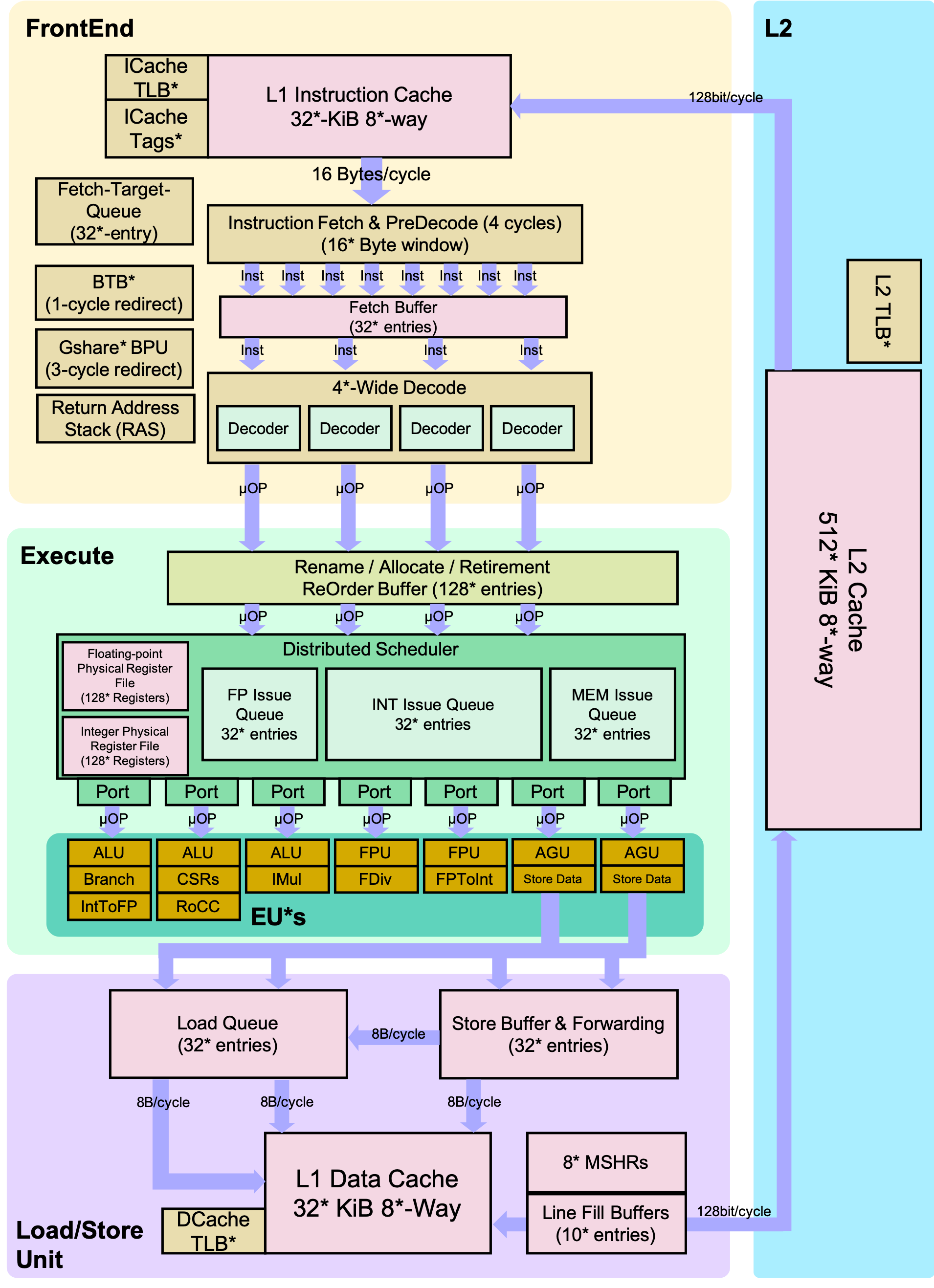
The Berkeley Out-of-Order Machine (BOOM) is a synthesizable, parameterized, out-of-order superscalar RISC-V core. It is a unified physical register file design (also known as explicit register renaming) with a split ROB and issue window. To build an SoC with a BOOM core, BOOM utilizes the Rocket Chip SoC generator as a library to reuse different microarchitectural components (TLBs, PTWs, etc.).
Pipeline
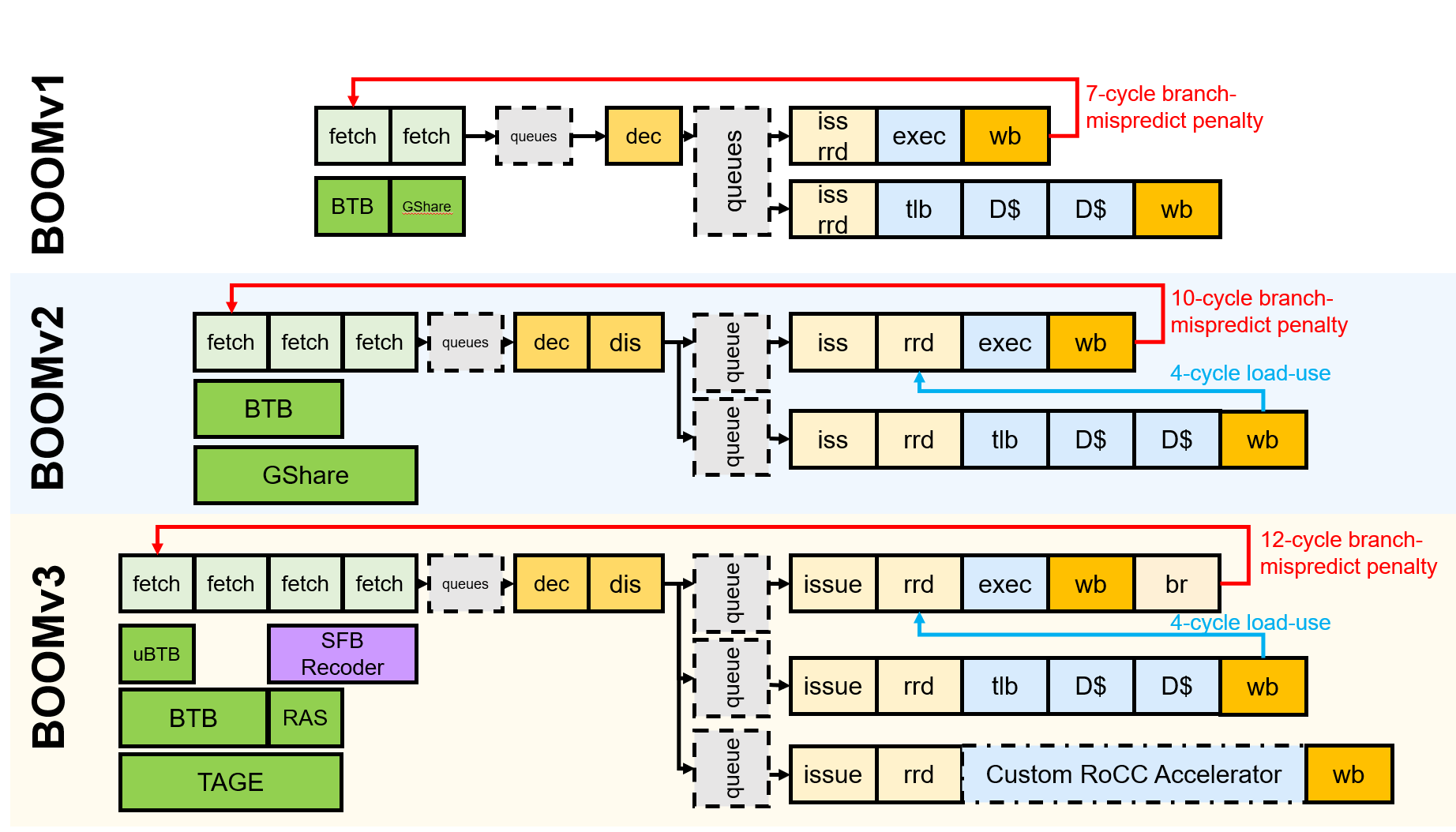
Conceptually, BOOM is divided into 10 stages: Fetch, Decode, Register Rename, Dispatch, Issue, Register Read, Execute, Memory, Writeback, and Commit. However, some of those stages are combined in the current implementation. Additionally, some of these stages are pipelined across multiple pipeline stages.
Fetch
Instructions are fetched from instruction memory and pushed into a FIFO queue, known as the Fetch Buffer. Instruction pre-decode is performed to find alignments of 16-bit vs 32-bit instructions. Branch prediction also occurs in this stage, redirecting the fetched instructions as necessary.
Decode
Decode pulls instructions out of the Fetch Buffer and generates the appropriate “micro-ops” (μops) to place into the pipeline.1
Rename
The ISA, or “logical”, register specifiers (e.g., x0-x31) are then renamed into “physical” register specifiers.
Dispatch
The μop is then dispatched, or written, into a set of Issue Queues.
Issue
μops sitting in an Issue Queue wait until all of their operands are ready and are then issued. This is the beginning of the out-of-order portion of the pipeline.2
Register Read
Issued μops first read their register operands from the unified Physical Register File or from the Bypass Network.
Execute
μops then enter the Execute stage where the functional units reside. Issued memory operations perform their address calculations in the Execute stage, and then store the calculated addresses in the Load/Store Unit, which resides in the Memory stage.
Memory
The Load/Store Unit consists of two queues: a Load Address Queue (LDQ) and a Store Queue (STQ). Loads are fired to memory when their address is present in the LDQ. Stores are fired to memory at Commit time (and naturally, stores cannot be committed until both their address and data have been placed in the STQ).
Writeback
ALU and load results are written back to the Physical Register File.
Commit
The Reorder Buffer (ROB) tracks the status of each instruction in the pipeline. When the head of the ROB is not busy, the ROB commits the instruction. For stores, the ROB signals to the store at the head of the Store Queue (STQ) that it can now write its data to memory.
Branch Support
BOOM supports full branch speculation and branch prediction. Each instruction, no matter where it is in the pipeline, is accompanied by a Branch Tag that marks which branches the instruction is speculated under. A mispredicted branch requires killing all instructions that depended on that branch. When a branch instruction passes through Rename, copies of the Register Rename Table and the Free List are made. On a mispredict, the saved processor state is restored.
Directed Portion (20%)
Terminology and Conventions
Throughout this course, the term host refers to the machine on which the simulation runs, while target refers to the machine being simulated. For this lab, an instructional server will act as the host, and the RISC-V processors will be the target machines.
Setup
Once logged in the instructional server, clone the new lab materials into an appropriate workspace and initialize the submodules.
cd ~ # go to your home directory
git clone -b fa26-lab3 https://github.com/cs152-teach/chipyard-cs152.git cs152-lab3-fa26
cd cs152-lab3-fa26
ln -sfn /home/ff/cs152/fa26/chipyard/.conda-env .conda-env
source ~/conda/etc/profile.d/conda.sh
conda activate .conda-env/
./build-setup.sh riscv-tools --skip-conda --skip-toolchain --skip-circt --skip-firesim --skip-marshal
Then, run
export LAB3ROOT=$(pwd)
source env.sh
After setting up the repository, you must set up the Chipyard environment whenever you open a new terminal. As in Lab 2, create a helper script ~/cs152-env.sh that does this in one command (this updates the same file you used in Lab 2):
cat > ~/cs152-env.sh << 'EOF'
# CS152 lab environment. Usage: source ~/cs152-env.sh [lab-directory]
source ~/conda/etc/profile.d/conda.sh
cd ~/"${1:-cs152-lab3-fa26}"
conda activate .conda-env/
export LAB3ROOT=$PWD
export SIMDIR=${LAB3ROOT}/sims/verilator
source ./env.sh
EOF
Then, in each new shell, enter the lab environment with:
source ~/cs152-env.sh cs152-lab3-fa26
Performance Bottlenecks
Building an out-of-order processor is hard. Building an out-of-order processor that is well balanced and high performance is really hard. Any one component of the processor can bottleneck the machine and lead to poor performance.
For this problem, you will set the parameters of the processor to a low-end “worst-case” baseline (shown below) and incrementally introduce features. While some of these structures are on the small side, the machine should generally remain well-fed since only one instruction is dispatched and issued at a time, and the pipeline is not exceptionally deep.
| Worst-Case | Improved | |
|---|---|---|
| Physical Register File | 33 | 64 |
| Reorder Buffer | 4 | 16 |
| Branch Prediction | disabled | BTB, BHT, 8-entry RAS |
BOOM worst-case versus improved configurations
Collect and report the CPI numbers for the following benchmarks. Results for the in-order Rocket core have been provided for you. Note: Since the compile and simulation times can be fairly significant, you may gather the data in collaboration with other students and share them, but the questions must be answered independently.
dhrystone |
median |
multiply |
qsort |
spmv |
towers |
vvadd |
|
|---|---|---|---|---|---|---|---|
| Rocket | 1.200 | 1.379 | 1.136 | 1.427 | 1.690 | 1.029 | 1.024 |
| BOOM (worst-case) | |||||||
| BOOM (64 PRF) | |||||||
| BOOM (16 ROB) | |||||||
| BOOM (br. pred.) |
Each of the four design points is provided as a separate named configuration, so you do not need to edit any Scala. As you move down the rows of the table, each config adds one feature while retaining the features from the previous rows:
CONFIG |
|
|---|---|
| BOOM (worst-case) | CS152BaselineBoomConfig |
| BOOM (64 PRF) | CS152Baseline64PRFBoomConfig |
| BOOM (16 ROB) | CS152Baseline16ROBBoomConfig |
| BOOM (br. pred.) | CS152BaselineBPredBoomConfig |
The configurations are defined in ${LAB3ROOT}/generators/chipyard/src/main/scala/config/CS152BoomConfigs.scala (the WithNCS152BaselineBooms fragment and its four sweep knobs) if you would like to see exactly what each one changes.
For each design point, build the simulator and run the benchmarks in a batch.3 Taking the worst-case point as the example:
cd ${LAB3ROOT}/sims/verilator
make CONFIG=CS152BaselineBoomConfig
make CONFIG=CS152BaselineBoomConfig run-bmark-tests
cd output/chipyard.harness.TestHarness.CS152BaselineBoomConfig
Substitute CS152BaselineBoomConfig each target config. As in Lab 2, run the first build by itself; once it finishes you can build the remaining three configs in parallel, since they no longer contend to create the shared chipyard.jar.
run-bmark-tests runs the seven lab benchmarks and writes a <benchmark>.riscv.log and a <benchmark>.riscv.out into the specified output directory. The .out files hold a branch-prediction summary that you can ignore here but may use in Option 1: Designing Your Own Branch Predictor. Do not include raw dumps of either file in your report.
Part 1
Record the CPI (
mcycle / minstret) for all four BOOM design points across the seven benchmarks in a single table, alongside the Rocket results provided above. Provide a bar graph or other visual representation of your data as well. Then, answer the following questions:
Compare the results for 1-wide BOOM with the in-order, 5-stage Rocket core. Was out-of-order issue an improvement on the CPI for these benchmarks?
Explain the impact of each microarchitectural change.
Is branch prediction with a BTB, BHT, and RAS always a benefit?
Feedback Portion
In order to improve the labs for the next offering of this course, we would like your feedback. Fill out the Lab 3 feedback form Lab 3 feedback form. Every student should submit the form individually, including the questions about your team. It asks how long each portion took you, what you liked and disliked most, what you would change, and how the work was divided within your team.
Feel free to write as much or as little as you prefer (a point will be deducted only if the form is left completely empty).
-
Because RISC-V is a RISC ISA, currently all instructions generate only a single μop. ↩
-
More precisely, μops that are ready assert their request, and the issue scheduler within the Issue Queue chooses which μops to issue that cycle. ↩
-
You can build and run the simulator in parallel by adding the
-j Nflag to themakecommand, but refrain from spawning an excessive number of jobs so as to be fair to other users.N = 4is probably acceptable. ↩