Directed Portion
Improve canny_gaussian_blur by reusing coordinate and address calculations.
Measure the effect on the full pipeline while preserving the blurred pixels.
Complete the setup before starting. The example you ran
loads a grayscale PGM image and writes an SVG line drawing. A pipeline is the
sequence of processing stages between that input and output.
Finding the Code
src/pipeline.c calls the processing stages; src/canny/blur.c contains the
blur function you will change. The rest of src/ contains the other stage
implementations. include/ declares the supplied interfaces, app/ contains
the command-line and file-handling code. scripts/test_pipeline.c contains the
pipeline tests and result-dumping code; scripts/check.py runs those tests and
checks the application output.
Before Changing Code
- Put implementation changes and private headers under
src/. Leave the supplied files ininclude/andapp/, and the Makefile, unchanged; those files are not part of your implementation submission. - Preserve the program’s results, input checks, and error handling. Matching the
SVG drawing alone is insufficient;
make benchmarkalso compares the data used to construct it. Support all valid inputs and parameters, without hardcoded benchmark answers. - Use the supplied build settings for every comparison. The course LLM policy applies to all portions; submitting AI-produced code is not allowed.
The full rules describe the interfaces and grader in more detail. You do not need those details to begin this exercise.
Background: Gaussian Blur
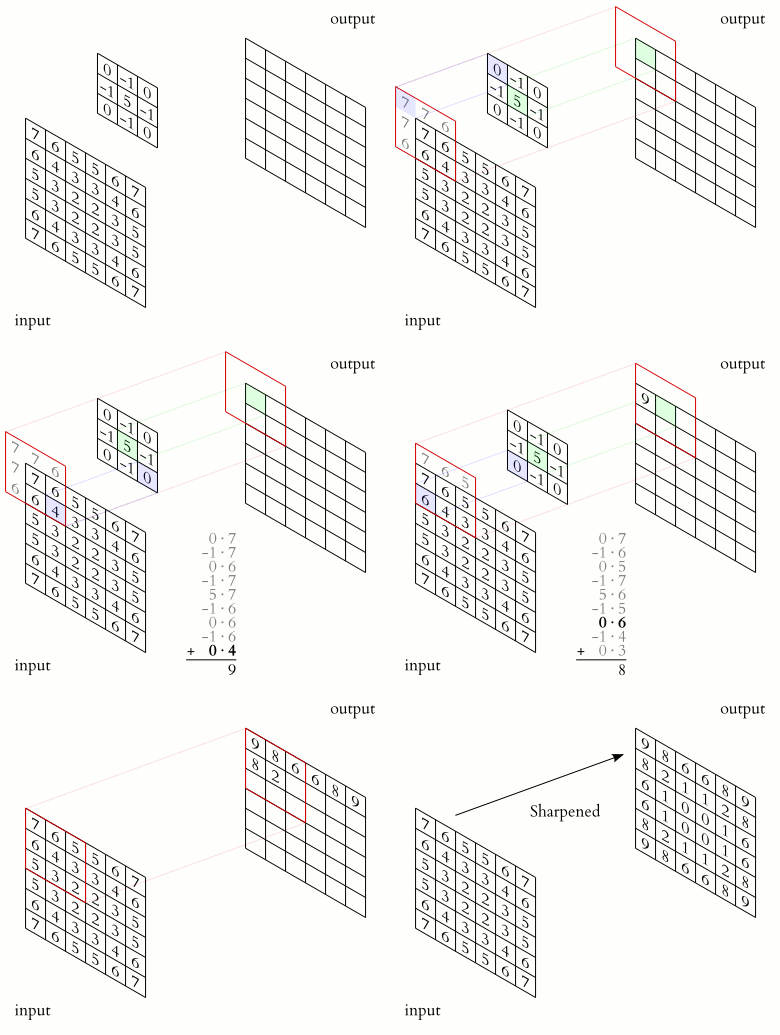
A Gaussian blur is a 2D convolution in which each output pixel is a weighted average of the input pixels around it, with the closest pixels weighted most. Our blur uses a 5×5 window, so every output pixel reads 25 input pixels. The grid of weights is called a convolution kernel. In timing output, “total kernel time” instead means the time for the full processing pipeline.
The animation below shows a small grid of weights sliding across the input. At each position, the weighted sum becomes one output pixel. Think about how the operation works spatially. That’s what will help you improve the blur function.
1. Measuring the Pipeline
src/pipeline.c calls each processing stage and records its execution time. The total kernel time measures the full processing pipeline; the stage timers show how that time is divided among its functions.
Run this from the repository root on your instance:
make benchmark WORKLOAD=directed
This saves your code, builds and tests it, and measures three workloads. A
workload is an input image: here, curves at 1024×1024 and 2048×2048, and texture
at 2048×2048. Each invocation saves an experiment under experiments/.
Do not delete this folder or its saved experiments; you will need them to
compare versions and prepare your report.
For each workload, the command prints total kernel times, then the current
version’s stage timings and each stage’s percentage of the total.
Each version is measured repeatedly. The mean is the average time; the standard deviation describes
how much they vary within that experiment. The tables show current, starter
(the original code), and previous (the latest successful experiment), when available.
Even rerunning unchanged code creates a new experiment.
The Benchmarking guide
explains the output and where to find saved results. Its other options are
references for later. Keep WORKLOAD=directed on each benchmark command in this portion;
without it, the default quick preset measures only the 1024×1024 curves input.
Run
make benchmark WORKLOAD=directeda few times without changing the code. For the 2048×2048 curves input, record the total kernel mean. How much does it vary between experiments?Use the stage timers to identify where the baseline spends its time. Which stage accounts for the largest fraction of execution time? What fraction does blur account for?
Using Amdahl’s Law (reviewed in section 1 of the Performance Engineering Reader), calculate the maximum possible speedup of the whole kernel if blur took no time. What does this bound tell you about the potential benefit of optimizing blur?
2. Analyzing the Gaussian Blur
Examine canny_gaussian_blur in
src/canny/blur.c. This exercise focuses on blur even if
another stage takes more time on your machine.
The outer loops select output coordinates (x, y); the inner loops select a
position in the 5×5 kernel. Images use row-major storage: rows are stored one
after another, so pixel (x, y) has array index y * width + x. The first term
is the row offset; x is the column offset. Use the Gaussian blur stage in the Program Guide
to review border handling and rounding.
Read the definitions of clamp_coordinate and pixel_index in
src/canny/internal.h before answering the questions.
Problem 2.1: Repeated Calculations
Consider only these three expressions in the original inner loop:
- The expression assigned to
input_x. - The expression assigned to
input_y. input_y * width, the row offset inside the input’spixel_indexcall.
Count source-level evaluations, before compiler optimization: each execution of an expression counts once, even when its arguments or result repeat. Distinct values means different numerical results of that expression over the kernel iterations for one output pixel, using the clamped coordinates. Different kernel positions that clamp to the same coordinate therefore produce one distinct value.
Assume width and height are at least 5. Compare an interior pixel at least
two pixels from every border with the top-left output pixel (x, y) = (0, 0).
For each of the three expressions, list the loop variables and fixed inputs it depends on. For one output pixel, hold
yandkernel_yfixed whilekernel_xchanges. Which expressions produce the same result? Now consider the hypothetical case wherexandkernel_xare fixed whilekernel_ychanges. Which expressions produce the same result?Next, finish all kernel iterations for one output pixel and move to the next output column in the same row. Assume
widthandheightdo not change. Of the three expressions, which results can be reused unchanged for the same kernel indices? Explain why. You may also describe any overlapping values that could be reused at different kernel indices.For each expression and each of the two output pixels, report (1) its source-level evaluation count and (2) the number of distinct numerical results. Explain which count border clamping affects and why.
Explain the difference between reusing an input pixel and reusing the calculation of its address. Which repeated work could be removed while keeping the same weighted samples?
Problem 2.2: Borders and Rounding
Trace the input coordinates used for the top-left output pixel. How does clamping affect the samples? Where does the function round its result?
What must remain unchanged for an optimized implementation to produce exactly the same pixels? Include border handling and integer arithmetic in your answer.
3. Modifying the Implementation
Problem 3.1: Removing Repeated Work
Modify canny_gaussian_blur to avoid repeating coordinate clamping and input
row-address calculations when their inputs have not changed. Use your answers
to Problem 2.1 to determine where these calculations belong. Derive the loop
structure yourself.
Keep the 25 weighted samples, border rules, and final rounding unchanged so that your implementation produces exactly the same blurred pixels. Limit your edits to the blur implementation. The task is to reuse coordinate and address calculations; do not replace the convolution algorithm or add threads.
Where can each reused value be calculated? When must it be updated? Does your design need additional storage? Compare the number of evaluations before and after the change. Explain why every use still receives the correct value.
Before running the modified program, predict its effect on total kernel time and explain why. The compiler may already remove some repeated work, so fewer source-level operations do not guarantee lower execution time.
4. Evaluating the Change
After your change, run the same command:
make benchmark WORKLOAD=directed
It saves this version too, runs the tests, and checks the complete pipeline result against the starter and previous successful version. If the results match, it benchmarks those versions on the same inputs and reports speedups. A failed build or correctness check is saved, but does not become a comparison version.
Problem 4.1: Correctness and Performance
Use the 2048×2048 curves results to evaluate your change. Compare against the
starter version; the previous version may be another run of your modified code.
Repeat make benchmark WORKLOAD=directed to check consistency. Speedup is the time before your
change divided by the time after it.
Present the before-and-after total kernel times in a table. Include units and show how much the times vary.
Calculate the total kernel speedup. How much time did the change save or add? Is the difference large enough to distinguish from run-to-run variation? Compare the result with your prediction. Include your correctness checks and source diff.
If performance did not improve, explain what you tested and why the result may differ from your prediction.
Problem 4.2: Workload Dependence
The directed preset also measures 1024×1024 curves and 2048×2048 texture.
Use those saved results to compare the effect of your change on all three
workloads; no separate image-generation commands are needed.
Present the total kernel speedups for all three workloads. How does the benefit change with image size and pattern? Use the baseline’s fraction of time spent in blur to help explain your results.
Submission
Submit your answers to the graded questions, your blur source diff, correctness results, and before-and-after timings for the three workloads on Gradescope. Use the source from the final experiment you report. Obtain a source diff between the starter and final blur files. For example, if your final experiment is 005, run on the instance:
diff -u experiments/starter/source/src/canny/blur.c experiments/005/source/src/canny/blur.c > blur.diff
Replace the final experiment number with your own. diff returns status 1 when it
finds differences; that is expected. Use VS Code Remote SSH or scp to retrieve
the diff and other evidence needed on your laptop.
Download any experiments you want to retain before losing access to the instance; pushing your code does not back up the ignored experiment history.
Continue to the open-ended portion when you are finished.